
Have you ever searched your name on Google and found nothing? It feels a little strange, right! As you can see, in this generation, being seen online matters. Whether you are a student, a small business owner, a content creator, or just someone proud of their work, it’s nice when people can find you easily. Basically, that’s where Google’s “Add Me to Search” comes in. So, this simple tool lets you create your own Google People Card. It’s like a mini profile that shows up in search results.
You can also add your name, a photo, what you do, your job, your hobbies, and links to your social media. It’s your space, your voice, your chance to say, “This is me. People often want to be known for something. Maybe it’s your art, your small shop, your blog, or your skills.
With a Google People Card, you don’t need to be famous. You just need to be you. It helps others find you faster and know more about you. Maybe someone wants to hire you. Or you can say a friend is trying to find your Instagram. Or someone saw your name somewhere and wants to learn more. Your People Card makes that search easy. You don’t need to build a big website. If you have a Google account and a phone number, you can make your card in minutes.
It’s simple, free, and made for real people just like you. Think of it like your digital business card. But instead of keeping it in a wallet, it lives on Google. And this is where anyone searching your name can see it. In this article, we are talking about this topic. So, keep reading to know more about it.
Add me to search card
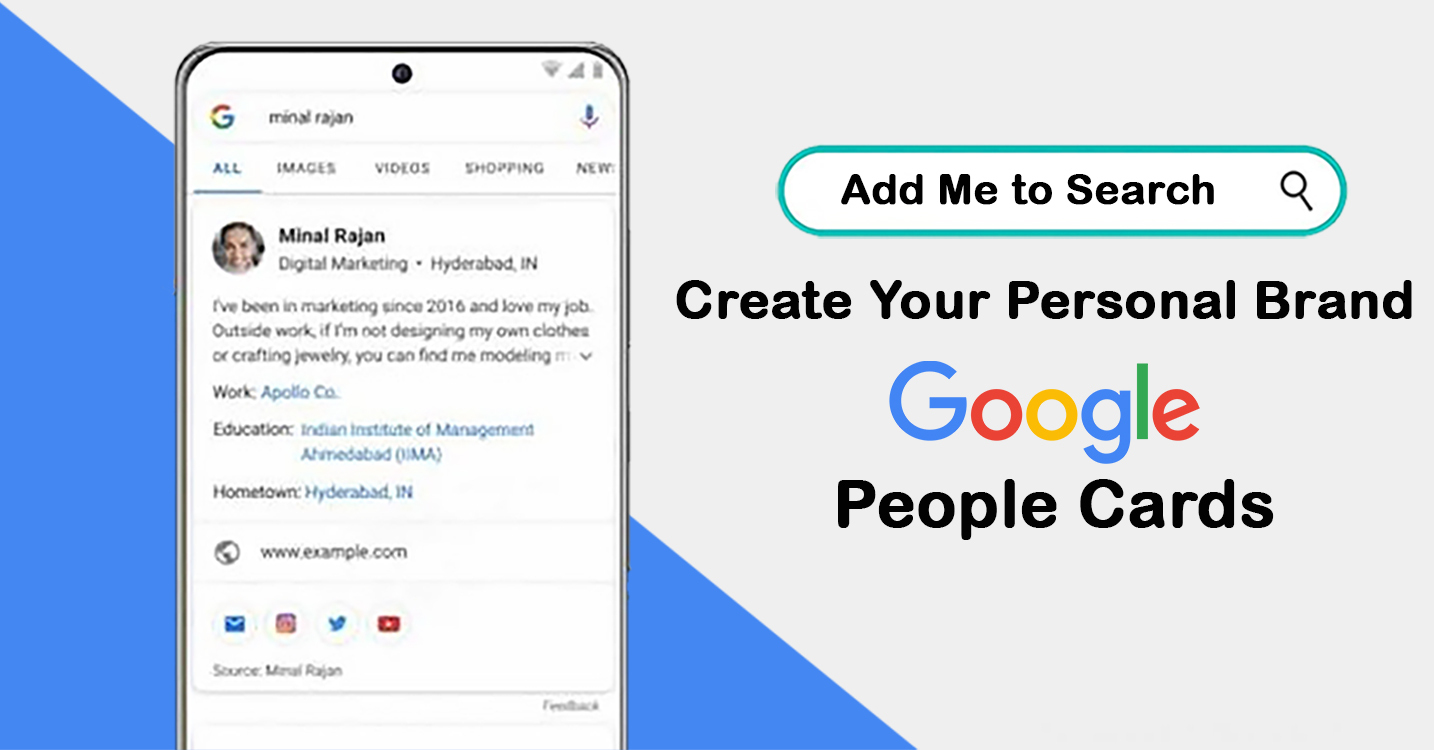
So, when someone searches your name, your card can appear right there in the search results. It shows your photo, name, job, hobbies, links, and a few lines about who you are. It’s like your digital name tag, but better. Making this card is free and easy. Moreover, you don’t need to be famous. You don’t need to own a website. So, you just need a Google account and a phone number for verification. In a few steps, you can create a real online profile that shows the world who you are.
This card is helpful in many ways. Let’s say someone hears your name and wants to know more. They type it into Google. If you have a card, they can see your photo, what you do, where to find you, and even links to your social media pages. That makes it easier for people to reach you, support your work, or connect with you. It’s also useful if you’re trying to grow. Maybe you’re a writer, an artist, a coach, or a student applying for jobs. When people search your name, this card gives them a quick, clear picture of you. That small space can make a big difference.
More Details
And you know what’s the best part! You control what it says. You can also write your name the way you want it seen. Moreover, you can describe your work in your own words. Then, you choose the photo. You also choose the links. It’s your voice, your card. There’s something special about feeling seen. We all want to feel like we matter. A Google People Card may seem small, but it’s a big step toward showing the world who you are. It’s not about being perfect or professional all the time.
It’s about being real, honest, and proud of your journey. So if you’ve ever felt invisible online, this card is for you. It’s your space to shine, even in the middle of millions of names. It’s Google saying, “Yes, we see you too.” And that’s a pretty amazing feeling.
Add me to search edit my profile card
So, here are some simple steps to help you make your Google Search profile. If you get stuck, don’t worry. You can follow these steps.
Step 1
- First, open the Google app on your phone. You can also use the Google browser.
- Now type one of these into the search bar:
- “Add me to search”
- “Add me to Google”
- “Create my people card”
- So, make sure your Web & App Activity is turned on in your Google settings.
- Then, once you search, look for the button that says “Add yourself to Google Search.”
Step 2
The second step is about starting to create your profile.
- First, scroll down a bit and click “Get Started.” You’ll see a page with a few simple instructions.
- Then you’ll get an option to create your public profile. Moreover, make sure you’re logged into the right Google account.
Step 3
The second step is about filling in your basic info. Now, it’s time to add your details.
- Name: First use your full name or business name. So, keep it the same as your other online accounts.
- Location: Then, add a place where people can contact you. So, use a real and active location.
- About: Next, write a short bio. This will show up in search results. So, keep it clear and catchy. You can also use a writing tool to help if needed.
- Occupation: Then, let people know what you do. So, add your job title or business name.
- More Info: You can also add your education, job details, or hometown. Basically, it’s up to you.
Step 4
- Adding your social links makes it easier for people to find you. You don’t have to add all of them, just 2 to 4 is enough. Some options are:
- YouTube
- GitHub
Step 5
- Once you’re done, you’ll see a preview of your card. Look it over. So, make sure all your details are right. Basically, this is how people will see you on Google.
- If everything looks good, press “Save.”
- That’s it. You’re done. Your card is now ready to go live.
Add me to search card benefits
Being found online is important today. Whether you are a student, a business owner, a freelancer, or just someone who wants to grow. Basically, you want people to find you when they search your name. That’s where Google’s “Add Me to Search” card can help in a big way. This tool lets you create your own small profile on Google. When someone types your name into the search bar, your card can show up. Basically, it feels good to know that people can find the real you and not someone else. Let’s talk about the benefits this card brings.
You become easier to find
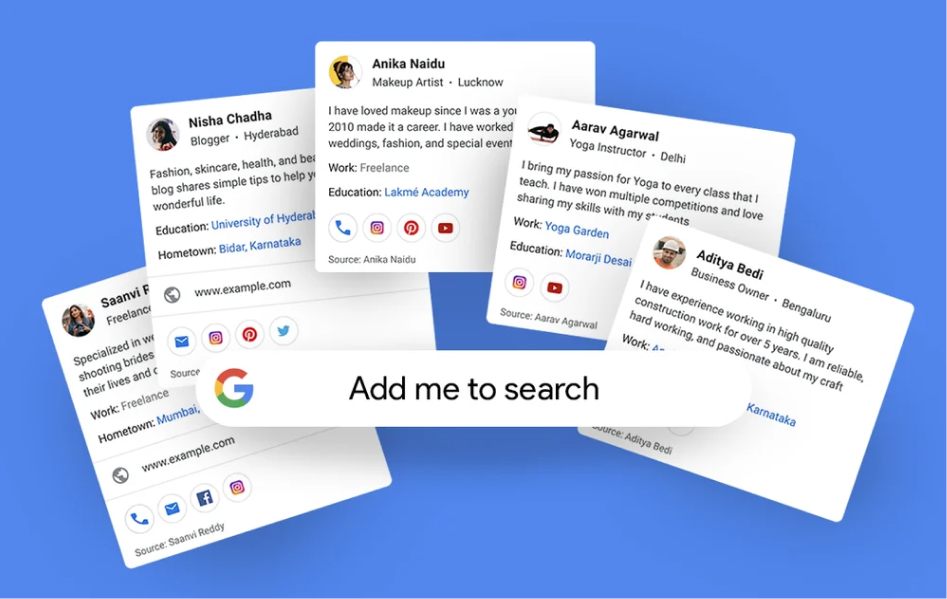
We all search for names sometimes. It could be a person we met, someone we heard about, or even a service we need. If you have a Google People Card, your name shows up clearly. It shows your photo, your job, what you do, and how to contact you. People don’t have to guess if it’s you or not, they’ll know right away.
It builds trust
When someone sees a clean, good profile in Google search, it feels real. It feels safe. Your card makes you look more professional and serious about what you do. Whether you’re an artist, a teacher, or a student, your card shows that you care about your work and want to be found.
It gives you control
You get to decide what’s on your card. You can write your own bio, choose your photo, and pick which links to share. That means you control your story. No one else speaks for you, only you do. You can even update it whenever you want.
Great for freelancers and small business owners
If you work for yourself, people might be searching for your name. Your card helps them find you, your work, and your services. You can add your job title, your business name, and your social media links. It’s like a free digital business card.
No cost and no need for a website
You don’t need to pay anything. You don’t need to make a full website. The card is quick to create and free for everyone. It’s perfect for people who are just starting out or don’t have the time to build a whole site yet.
A chance to shine
Your card is your space. You can show the world who you are. You can share your passions, your work, and your purpose. It’s more than just a name in search results. It’s a way to say that I exist too.
Add me to search not working
So, Google People Card is only available in four countries. These are India, Kenya, Nigeria, and South Africa. If you do not live in one of these countries, it will not work for you. Moreover, you won’t be able to create a People Card. If your People Card is not showing or working, don’t worry. Here are a few things you can try. So, check your Google account.
Make sure your personal Google account is working. If there’s a problem, fix that first. Then, turn on Web & App Activity. Your card only works if this setting is switched on in your Google account. So, use the right language. Basically, the People Card only supports English and Hindi. If your account is using another language, change it to one of these.
So, check your details. Make sure you fill in your name, profile picture, and contact info correctly. If anything is missing or wrong, your card may not work. So, give it some time. Sometimes, Google needs a few hours to update. Wait for half a day to a full day and check again later. Try logging out. Sign out of your Google account and then search your name on Google. See if your card shows up. If you still can’t see your People Card after trying all this, don’t worry. You can always contact Google Support for help. They can also guide you further.
How to delete Add me to search people card
Sometimes, we want to take a step back. Maybe your life has changed. Maybe you no longer want your name to show up in Google search results. Or maybe you just want some peace and privacy. No matter the reason, it’s okay. If you’ve made a Google People Card and now want to delete it, you can. And the process is very simple. Deleting your People Card means your name and info will no longer show in Google Search. It’s like removing a sign with your name from a busy street. You’re choosing to stay quiet for now and that’s completely your choice. Here’s how to delete your Google People Card in easy steps.
Step 1
- First, go to the Google app on your phone or open your browser.
- Make sure you are logged into the same Google account that you used to create the card.
Step 2
Follow the steps for editing your profile.
- Then, in the search bar, type, “Edit my people card.”
- Now press enter. Your card will show up at the top of the search results.
Step 3
- Then, click on the Edit Button. You’ll see an Edit icon (pencil) on your card. Tap or click on it.
- And, this will take you to the page where you can make changes to your card.
Step 4
Now you have to scroll down to the bottom.
- At the bottom of the page, you’ll see an option that says, “Delete my People Card.”
- Tap on that link.
Step 5
- The final step is to confirm the deletion. Google will ask if you’re sure you want to delete your card.
- So, click “Yes” or “Delete” to confirm. That’s it. Your card is gone. So, your information will no longer appear in Google search when people look up your name. Moreover, it may take a little time for Google to fully remove your card from search. Be patient. You can always create a new card later if you change your mind. Basically, nothing is permanent. If you ever feel unsafe or want to stay more private, deleting your card is a smart move.
Reference URL
https://www.bestsolutionofit.com/blog/how-to-drop-a-pin-in-google-maps/
